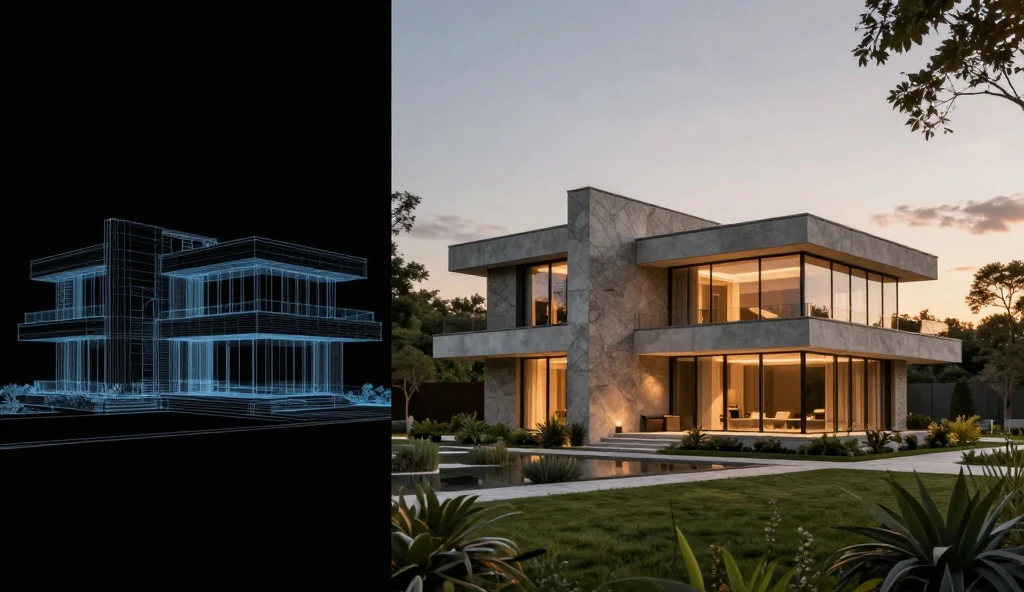
Are you tired of waiting hours for architectural renders? As an architect or interior designer, time is your most valuable asset. Enter Veras AI, a game-changing AI-powered visualization app that integrates directly with SketchUp, Revit, and Rhinoceros. In this review, we’ll explore why Veras AI is becoming a must-have tool for design professionals.
What is Veras AI?
Veras AI is an artificial intelligence rendering plugin that uses text prompts to generate high-quality, realistic images from your basic 3D models. Whether you need a hyper-realistic exterior shot or a cozy interior concept, Veras delivers in seconds.
Key Features That Stand Out:
Seamless Integration: Works as a plugin directly inside Revit, SketchUp, and Rhino. You don’t need to export or import files.
Geometry Override Slider: You control how much the AI sticks to your original model versus how much creative freedom it has.
Lightning Fast: Generates multiple design variations in under 5 seconds.
Material Selection: Simply type the materials you want (e.g., “warm wood panels, concrete floor”), and the AI applies them perfectly.
Pricing
Veras AI offers a flexible pricing model, starting with a free version for basic testing. For professionals, their premium plans are highly affordable compared to traditional rendering software.
To help you make an informed decision, here is a quick breakdown of the main pros and cons of using Veras AI:
Pros ✅
Fast real-time rendering directly within 3D modeling software
Easy-to-use interface suitable for both beginners and pros
Supports multiple platforms including Revit, Rhino, and SketchUp
Highly customizable prompts for fine-tuning exterior and interior details
Cons ❌
Requires a stable internet connection for cloud rendering
Free trial has limited rendering credits
Highly complex geometry may sometimes require manual prompt tweaking